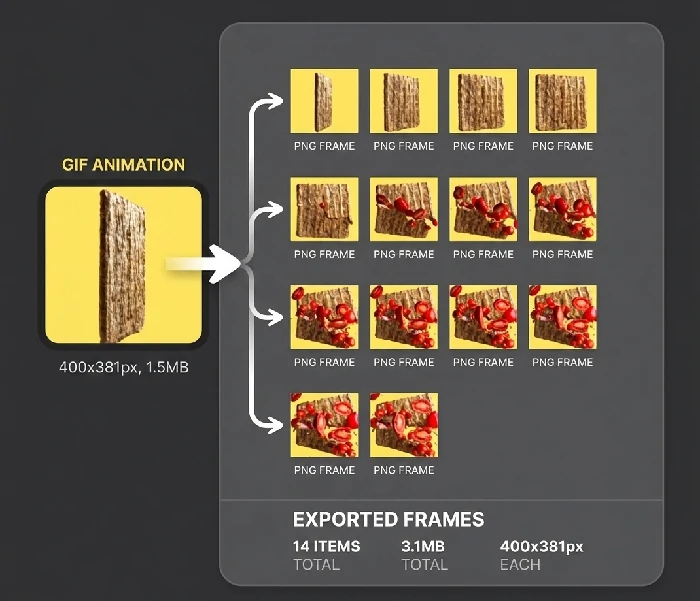
How to Extract Frames from GIF Online?
Easyconvert GIF Frame Extractor is a free online tool that extracts all
frames from animated GIFs, WebP, and APNG files as individual images.
All processing happens in your browser — no uploads, no sign-up.
Click the "Select File" button to choose an animated image or drag it to this page. You can also paste from clipboard (Ctrl+V).
Output Format
Choose PNG or JPG as the output format for extracted frames.
Output Size
Keep the original size or customize the dimensions of extracted frames.
3
Download Extracted Frames
Click the "Start" button, wait for processing to complete, then click "Download zip" to save all extracted frames.
>
What Formats Are Supported for Frame Extraction?
The tool supports extracting frames from animated GIF, animated WebP, and APNG files. All extracted frames are exported as individual PNG or JPG images.
>
How Many Frames Can Be Extracted?
There is no hard limit. The number of frames depends on the source animation. Most GIFs contain 10-100 frames. The tool handles hundreds of frames without issue.
>
Will the Extracted Frames Lose Quality?
No. Frames are extracted at their original resolution. If you choose PNG output, the frames are lossless. JPG output applies standard JPEG compression.
Other Tools
Compress Images
Convert JPG
Convert GIF
Convert WEBP Animation
Other Tools