How to Read EXIF Data Online?
This online EXIF reader runs entirely in your browser, eliminating the need to upload image files. It supports reading EXIF metadata from JPG, HEIC/HEIF, and dozens of RAW camera formats.
Click the "Select File" button to choose image files, or drag images directly to this page. You can also select an entire folder or paste images from clipboard (Ctrl+V).
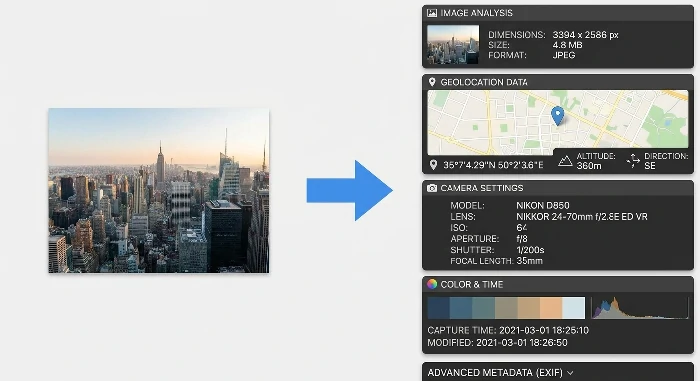
After importing, the tool automatically reads and displays all available EXIF metadata, including GPS location, camera information, exposure settings, timestamps, and more.
Browse through the extracted EXIF data including camera manufacturer, model, lens, aperture, shutter speed, ISO, focal length, GPS coordinates, altitude, and other shooting parameters.
>
What Is EXIF Data?
EXIF (Exchangeable Image File Format) data is metadata embedded in image files by digital cameras and smartphones. It contains detailed information about how the photo was taken, including camera settings (aperture, shutter speed, ISO, focal length), capture time, GPS location, device information, and more.
>
What Image Formats Are Supported?
The EXIF reader supports JPG/JPEG, HEIC/HEIF formats, and a wide range of RAW camera formats including CR2 (Canon), NEF (Nikon), ARW (Sony), RW2 (Panasonic), ORF (Olympus), PEF (Pentax), RAF (Fuji), DNG, and many more.
>
Can I Read GPS Location from Photos?
Yes, if GPS data was recorded when the photo was taken (common on smartphone photos), the tool will display the GPS coordinates including latitude, longitude, and altitude information.
>
Is My Image Data Secure?
Yes, all EXIF reading happens locally in your browser. Your image files are never uploaded to any server, ensuring 100% privacy and data security.
>
Can I Read EXIF from Multiple Images at Once?
Yes, the tool supports batch processing. You can select multiple files or an entire folder to read EXIF data from all images simultaneously.
>
How to Preserve EXIF When Compressing JPG?
To compress JPG files while preserving EXIF data, use the Compress JPG and Keep EXIF tool, which specifically maintains all EXIF metadata during compression.
Other Tools
Image Tools
Compress Tools
GIF Tools
Video Tools